
cPanel Hosting is a web hosting service that uses cPanel, a popular web-based control panel, to manage websites and hosting accounts easily.
Instead of managing a server through complicated command-line commands, cPanel provides a graphical interface where you can manage files, domains, emails, databases, SSL certificates, backups, and many other hosting features.
How cPanel Hosting Works
The basic process is:
Domain → Hosting Server → cPanel → Website
For example, if you purchase example.com and connect it to your cPanel hosting account, you can use cPanel to upload your website files and configure the necessary services.
Main Features of cPanel Hosting
1. File Manager
You can upload, download, edit, move, rename, and delete website files directly from your browser.
2. Domain Management
Depending on the hosting provider, you can manage:
- Addon domains
- Subdomains
- Parked/alias domains
- Domain redirects
3. Email Accounts
You can create professional business email addresses such as:
info@example.comsupport@example.comadmin@example.com
You can also manage email forwarding, autoresponders, spam settings, and other email features.
4. MySQL Databases
cPanel allows you to create and manage MySQL/MariaDB databases, database users, and permissions. This is especially important for WordPress and other PHP-based websites.
5. SSL Certificate
You can install and manage SSL certificates so your website uses:
https://example.com
rather than:
http://example.com
6. WordPress Installation
Many cPanel hosting providers include tools such as Softaculous, allowing users to install WordPress quickly without manually uploading and configuring all WordPress files.
7. Backup Management
Depending on the hosting provider, cPanel can provide tools for creating or restoring backups of website files, databases, email accounts, and other hosting data.
8. FTP Management
You can create FTP accounts and use applications such as FileZilla to upload and manage website files.
9. Website Statistics
cPanel may provide information about bandwidth, disk usage, visitors, error logs, resource usage, and other hosting statistics.
10. Security Management
Depending on the server configuration, cPanel may provide features such as:
- IP blocking
- SSL/TLS management
- Password protection
- Two-factor authentication
- Hotlink protection
- Security-related settings
Who Uses cPanel Hosting?
cPanel Hosting is suitable for:
- Small business websites
- WordPress websites
- Blogs
- News portals
- Portfolio websites
- Corporate websites
- E-commerce websites
- Landing pages
- Multiple small websites
- Web designers and developers
cPanel Hosting vs Regular Hosting
Technically, cPanel is a control panel, not a separate type of server.
For example:
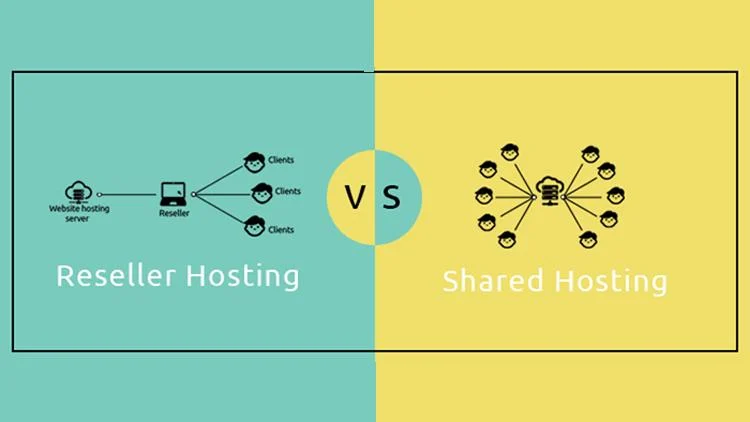
Shared Hosting + cPanel = cPanel Shared Hosting
Reseller Hosting + cPanel/WHM = Reseller Hosting
VPS + cPanel = cPanel VPS Hosting
So when a hosting company advertises “cPanel Hosting,” it generally means the hosting service includes cPanel as the control panel for managing the account.
cPanel vs WHM
This is particularly important for hosting businesses.
cPanel is mainly used by individual hosting accounts to manage websites.
WHM (WebHost Manager) is used by server/reseller administrators to create and manage cPanel hosting accounts.
For example:
WHM → Create Customer Account → Customer receives cPanel → Customer manages Website
This is why Reseller Hosting commonly includes WHM + cPanel.
Advantages of cPanel Hosting
✅ Easy to use
✅ No advanced Linux knowledge required for basic management
✅ Easy WordPress installation
✅ File Manager included
✅ Email management
✅ Database management
✅ SSL management
✅ Backup tools
✅ Domain management
✅ Suitable for beginners and businesses
✅ Widely used by hosting companies
Limitations
cPanel Hosting can also have some limitations:
- cPanel licensing can increase hosting costs.
- Shared hosting has limited server resources.
- Some advanced server configurations require root/server-level access.
- Performance depends heavily on the hosting provider and server configuration.
Example
Suppose you purchase cPanel Hosting for a business website.
You would typically:
- Register a domain.
- Purchase cPanel hosting.
- Point the domain’s DNS/nameservers to the hosting server.
- Log in to cPanel.
- Install WordPress or upload your website.
- Create a database if necessary.
- Enable SSL.
- Create professional email accounts.
- Configure backups.
- Launch the website.